Why Passwords Matter in Identity Theft

In my previous series blog post, I introduced identity theft and explained its growing impact on people around the world. With your personal, digital, financial, and medical identity at stake, you should be worried about the possibilities of getting your identity stolen. Because the Identity Theft Resource Center warns that identity theft could result from data breaches and personal negligence at the very least, no single solution is capable of solving all forms of identity theft. However, as Verizon suggests in its 2019 Data Breach Investigation report, passwords play a large role in both the cause and aftermath of identity theft. Considering that a weak password allows a hacker to access a “protected” database and gain access to what is most like going to be usernames and passwords, passwords as a whole should not be overlooked.

As suggested, passwords play a large role in identity theft. Thus, while you and I might feel tempted to solely blame and hold companies liable for managing our data, they are not entirely to blame. To Robert Siciliano, a security analyst and CEO of Safr.me, argues that we could take better precautions at being wiser with our passwords. Siciliano and many other experts agree that many people don’t take their passwords seriously and set them common passwords like “password” and “123456”. Instead, Siciliano argues people to include “uppercase, lowercase, numbers, and characters” as well as “ change them up frequently”. Create a more complex password will diminish the possibility of a hacker trying to brute force popular sites with common passwords using stolen email addresses. While I most certainly agree with Siciliano, what he fails to mention is why people should do so. Not providing such an answer could deter some from fulfilling such steps as they don’t understand what is the point.

Because it is most certainly true that a data breach would provide a hacker with the email, username, and password of your account for that service, I argue that by changing passwords for each digital account, you would be safer. In my perspective, if you go with the same password for every account, a hacker would essentially brute force your credentials on the most common online services and gain access to all of them. Therefore, to limit the impact of a single breach, one should use a completely different password for each account. In fact, while remembering a new password for each account might seem daunting, I suggest the use of password managers like 1Passowrd. Such services do all the storing and the generation of random and complicated passwords for you and make use of U.S. government employed encryption algorithms to store those random passwords safely. 

Still, while a strong password won’t help much when in the hacker’s hands and switching passwords will only help in reducing the spread of a breach, one can add more layers of security to their accounts through additional authentication steps. Known as multi-factor authentication, these extra layers could take the form of SMS codes, emailed codes, and dedicated apps like Google Authenticator. All these methods work by providing a code that a login page requires in addition to credentials. Some experts approve of multi-factor authentication and argue for its widespread use due to its effectiveness. Take Troy Hunt, a security expert and CEO of Have I Been Pwned, suggests that one is able to use multi-factor authentication to better protect their accounts. As a result of those services, Hunt argues that “fewer accounts get compromised every time there’s a security breach.” Because a hacker essentially hits a login page requesting a code that they don’t have, they will be stopped before they are able to access the account. While to Hunt two-factor authentication works, I argue solely relying on it should be avoided.

As Verison puts it, “two-factor authentication is the spool pins in the lock” but it doesn’t necessarily mean that the lock cannot be broken. Take the case of email conformation. Should the hacker been able to access one’s email account using the same credentials as the ones they stole, using an emailed code as a security layer wouldn’t have been helpful. Siciliano would have agreed to such an example, allowing him to further prove the need to frequently change passwords among accounts. Even so, Kevin Mitnick, a former FBI most wanted hacker and now chief hacking officer at KnowBe4, also agrees with my point. Mitnick argues that a hacker who already knows your email could phish you into opening a website through a modified portal and unknowingly give them your two-factor authentication code. Thus, Mitnick suggests that even with the most advanced two-factor authentication, some social engineering could potentially bypass this security layer.

Regardless, my suggestion for protecting yourself from identity theft is to employ a combination of these methods. While it is proved that no method is perfectly capable of stopping a hacker from logging into your account and stealing your identity, by changing passwords for each account, using a password manager, and utilizing two-factor authentication, you would be capable of preventing unwanted digital access. Because not every hacker is a most wanted FBI hacker like Mitnick, a combination of these methods would be more than capable of stopping most hackers from doing more than attempting to use your stolen credentials. In the last few years of using a combination of these methods, I have yet to experience unwanted logins in any of my accounts. Therefore, as my solution has worked flawlessly for me saw far, I too believe that for you to follow such a strategy would help you in fending off identity theft.

Bibliography

Lane, Gina W., and Daniel Z. Sui. “Geographies of Identity Theft in the U.S.: Understanding Spatial and Demographic Patterns, 2002-2006.” GeoJournal, vol. 75, no. 1, 2010, pp. 43–55. JSTOR, http://www.jstor.org/stable/41148383. Accessed 4 Mar. 2020.

2019 Data Breach Investigations Report. Verison, 2019.

“Expert Interview with Robert Siciliano on Identity Theft.” Mint, 25 June 2014, http://www.mint.com/personal-finance-interviews/expert-interview-with-robert-siciliano-on-identity-theft.

“Identity Theft.” Consumer Information, 19 Feb. 2019, http://www.consumer.ftc.gov/articles/0005-identity-theft.

Long, Emily. “Common Habits That Put You at Risk for Identity Theft.” NBC News, 2018, http://www.nbcnews.com/better/business/6-common-habits-put-you-risk-identity-theft-ncna899251. Accessed 10 Mar. 2020.

Pascual, Al, et al. “2017 Identity Fraud: Securing the Connected Life.” Javelin, 1 Feb. 2017, http://www.javelinstrategy.com/coverage-area/2017-identity-fraud. Accessed 10 Mar. 2020.

Whittacker, Zack. “Cybersecurity 101: Two-Factor Authentication Can Save You from Hackers.” TechCrunch, 25 Dec. 2018, techcrunch.com/2018/12/25/cybersecurity-101-guide-two-factor/. Accessed 10 Mar. 2020.
Why Stop Identity Theft?

Let’s put it, when you give your personal information to a company, it should be well protected. You would expect a company to have the proper infrastructure in place in making sure that no hacker or wicked employee would be able to access the client data maliciously. After all, if they do, then your credit card, social security, address, name, and more is now in the hands of an individual who would be able to impersonate you and cause havoc in physical and digital life. Unfortunately, the frequency of data breaches are all too common. According to IT firm Risk Based Security, an estimated 7.9 billion records of user data were stolen by hackers in 2019 alone. Allow that sink in, if just one of the 7.9 billion stolen records was your data, its likely that you too could fall victim to identity theft.

Identity theft looks and should be scary, and with its growth being even more disturbing. Picture this, in 2009, the U.S. Federal Trade Commission(FTC) noted that it received 1.4 million identity theft complaints equating to 1.7 billion dollars in damages. Ten years later,  in 2019, the FTC stated that it received over 3.2 billion identity theft reports, with a staggering 1.9 billion in damages. Thus, if the trend continues, more Americans like me and you would find ourselves victims of identity theft. In fact, worldwide, Javelin’s 2019 Identity Fraud Study found there were as many 14.5 million identity theft related complaints. However, behind the rise of identity theft, there has to be a fuel to its growth. Simply put, why is the trend of hackers chasing user data rising?

The answer lies in the information itself. Companies today demand a wide spectrum of information when one signs up for their services. In my experience alone, when creating online accounts for companies, a lot of the time I saw them ask for first and list name, phone number, address, and even credit card information. Take Facebook for example, when registering, they wanted me to input a lot of this personal data before I could use their services. With so much user data in the hands of companies, it is without a doubt why hackers are turning to companies for their data. Knowing that one successful data breach is a path to a wide-range of identity theft attacks, its not surprising that hackers are determined.

With most stolen data being credentials, personal data, or medical according to Verizon’s 2019 Data Breach Investigation Report, it shouldn’t be a surprise as this type of information is the most common required by companies upon registrations. While consumer reporting companies like Experian suggest that raw information such as credit cards and social security numbers are worth from $1 to $100, the raw data could be assembled into something more. Gary Cantrell, head of investigations at HHS Office of Inspector General, argues that while a medical report might seem basic, it is actually a “a treasure trove of all this information about you.” Hackers could parse the document for the social security number, address, patient name, and finance records to “take out a loan or set up a line of credit under patients’ names.” Thus, even the little data could be dangerous if properly utilized by hackers.

Take Brandon Reagin, a victim of medical identity theft who had his information stolen in one of the numerous breaches in 2004. Reagin, like many, experienced identity theft for the first time and learned of its severity only after falling victim. Reagin remembers it starting with “charges on his credit report”, which he repeatedly reported as suspicious to the bank. As Reagin calls it, the whole process was a “tumultuous decade of a mess”, with the breach never leaving him. Even 15 years after the breach, Reagin hasn’t been able to “undo all of the damage” including the “integrity of his own medical files.” As I put it earlier, the hacker who stole Reagin information was able to utilize the information for more than what it was worth. In Reagin’s case, with his medical report, the hacker was able to use it to steal cars and rack up “$20,000 worth of medical procedures.”   

As the issue is displayed on to me, I feel that something must be done. Companies today hold too much user data and aren’t taking its security serious. Thus, Identity theft is becoming an ever-growing problem, with company mismanagement of user data costing users like Brandon and possible to be you and me unneeded stress and liability. With that said, due to the severity of the issue, many solutions have been proposed in tackling this problem of identity theft. My next series post will discuss this ongoing debate, by analyzing the different solutions for their pros and weaknesses as well as suggesting myself what could be done to tackle identity theft from the company and user sides.

Bibliography

Anderson, Keith B., et al. “Identity Theft.” The Journal of Economic Perspectives, vol. 22, no. 2, 2008, pp. 171–192. JSTOR, http://www.jstor.org/stable/27648247. Accessed 26 Feb. 2020.

Schneier, Bruce, and Journal of International Affairs. “ON CYBERSECURITY.” Journal of International Affairs, vol. 71, no. 2, 2018, pp. 121–124. JSTOR, http://www.jstor.org/stable/26552335. Accessed 26 Feb. 2020.

“What Hackers Actually Do with Your Stolen Medical Records.” Advisory Board Daily Briefing, http://www.advisory.com/daily-briefing/2019/03/01/hackers.

United States, Federal Trade Commission. Consumer Sentinel Network Data Book 2019. Government Printing Office, 2019. 

United States, Federal Trade Commission. Consumer Sentinel Network Data Book 2009. Government Printing Office, 2009. 

“2019 Identity Fraud Study: Fraudsters Seek New Targets and Victims Bear the Brunt.” Javelin, 6 Mar. 2019, http://www.javelinstrategy.com/coverage-area/2019-identity-fraud-report-fraudsters-seek-new-targets-and-victims-bear-brunt.Meissner, Gerd. “2019 In Review: Data Breach Statistics and Trends.” Security Boulevard, 16 Jan. 2020, securityboulevard.com/2020/01/2019-in-review-data-breach-statistics-and-trends-4/.

Ransomware Infographic

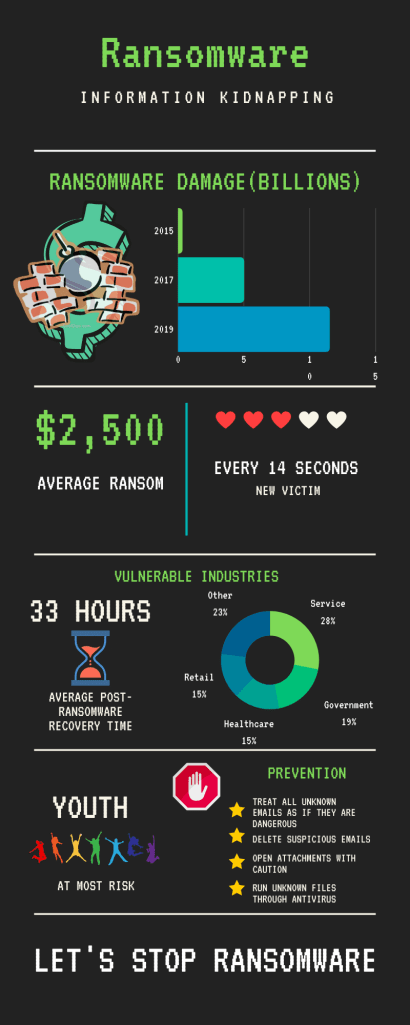
In my infographic, I am seeking to increase awareness of ransomware attacks. Because ransomware is proving to be an easy source of money for hackers, such attacks are becoming ever so more popular. Therefore, in my infographic, I’m trying to inform others what ransomware is, what industries and people are most susceptible, and what could be done to prevent it. Overall, I felt that I was able to succeed in spreading that message, primarily due to the way I structured my infographic.

Through data like the post ransomware economic damage bar graph and other statistics, I was able to convey my perspective on ransomware. I specifically chose those talking points with the intention of aiming at the largest audience that I could. By targeting both individuals and companies, I could raise the awareness of both. For instance, through the cost of a ransomware payment, individuals would realize the importance of prevention. Likewise, when companies see the frequency of the attacks, affected sectors, and overall economic damage cost, they would get alarmed and hopefully combat it. To address the concerns of individuals and companies, I decided to address some prevention tips aswell.

The infographic is organized by presenting a problem first and then offering a solution afterward. As the reader navigates down the infographic, they are met with statistics and graphs that would most likely alarm them. Then towards the end of the infographic, some suggestions are introduced to reduce the chance of getting ransomware. Lastly, the last part of the infographic says “Let’s stop ransomware” suggesting that action should be taken by following the prevention tips. Hence the emphasis of the infographic is to take action.

The use of images serves as symbolic bookmarks if one decides to skim through the infographic. Because the images serve as representations of the information in the sections either directly or symbolically, one can get an idea of the content before reading the text. For instance, in the case of the statistics of the frequency of data breaches, the 3 out of the 5 hearts aims to show the video game-like health damage that on takes after going through ransomware. While in other cases, the stop sign with the hand serves to slow the reader down to that section to make sure that they don’t overlook the prevention tips. 

If I had the chance to redo or improve on my infographic, I would have done it through an application such as Photoshop. Because Canva is very limiting in terms of data representation as well as general design, it is very difficult to create a nice and artistic infographic. Given the time, I would have designed an infographic that took the appearance of a ransomware software with my statistics blending into the layout. For example, putting the average payment cost into the bitcoin fee section and the average recovery time instead of the remaining time for payment would have been good ideas. While the ransomware software template would have served well to blend in information, it would have also double served as a chance for the audience to see what such software would look like. Thus, the audience would have felt a genuine scare upon looking at the infographic while learning more about what ransomware is at the same time.

The main difference between a blog post and an infographic is the infographics ability to display pure information without the necessity of paragraphs. This allows for direct data delivery without the need to scan through the passage looking for the data. Additionally, the infographic allowed me to visualize the data through graphs which is very difficult to do so with words alone. While it is easy to say the statistics with words alone, getting the scale of the situation through the visuals makes a lasting effect on the audience. By seeing patterns and yearly changes, the audience would be able to understand the severity of the situation better.

Stopping Inside Actors

While in my previous blog posts I’ve shown that data breaches are usually the result of hackers  remotely attacking companies, such situations are not always the case. If fact, according to the 2019 Verizon Data Breach Investigation Report, 34% of breaches are a result of “internal actors” from within the company. Consequently, because internal actors have more authority and power than hackers, solving the problem through security software won’t prove to be useful. Thus, if security software won’t fix the problem, what can you do to curb employees from releasing personal data of your clients?

Because an internal actor could be a co-worker or even a boss, it is difficult at times to place the finger on them. Lisa Forte, a cyber threat specialist at Red Goat Cyber, argues that the current procedures of many companies places too much priority at stopping “outsiders and not insiders”. Still, instead of actively looking for suspicious employees, Forte argues that the best form of prevention is through training and “deterring people in the first place”. Though while training might seem like a good solution, personally, I would have to disagree with Forte.

While training your employees might help them uncover and report an internal actor at work, I argue that not much could be done when the internal actor is malicious and at home. In other words, no matter how hard you monitor your employees, you cannot watch them at home. According to the 2019 Varonis Data Risk Report, 17% of all sensitive files can be accessed by every employee in a company. Thus, an internal actor who brings their laptop home would have the freedom to do anything they want with the data with the assurance that no one is watching them. So what can you do then? What I believe could be done in these situations is a software that gates access to the data and logs each time a company employee accesses it. This software would work with hardware in the office to unlock the database only within the registered proximity. As a result this would make the data more difficult to steal unnoticed and make the actor reconsider their actions. Thus, through the presence of other people at work and the thought that one’s actions are recorded, individuals would be less tempted to steal data.

Still, while at times the insider actor’s intentions are malicious, it is not always the case. To Dr. Richard Ford, Chief Scientist at Forcepoint, “most insider threats are perfectly well-meaning employees” who do “something foolish or get convinced to do something foolish” that results in a breach. Ford explains many people are “accidental insiders” who perform rookie mistakes such as giving credentials to the wrong people. Ford suggests that in this case, the best option would be to train individuals to make sure such mistakes dont happen. In this case, I would have to agree with Ford. 

Unlike Forte’s suggestion that requires training to serve as a threat for insider actors, Ford advocates training for those who are new to the industry. Though, to add to Ford’s solution, I would have to say that while training may certainly help, those who are willing to hand out high-value credentials to strangers should not be in the position to handle important data. Wouldn’t such a thought be common logic? Thus, to prevent internal actors whether malicious or accidental, I would propose that frequent screening should take place. This will dynamically shift the certification within companies on who is responsible and clear to handle confidential data. Additionally, in between the screenings, by monitoring logs companies would have additional warnings to spot bad actors. 

Thus, my digital and physical solution to stopping most internal actors would greatly help you. Ford would most likely support my idea of screening as this would stop rookies from having access to valuable data. Additionally, Forte would mostly accept my extension to her idea that proximity and logging software would help cover the limitations to strictly training employees. Ultimately, through a combination of our ideas, the threat of internal actors at your work would diminish.

Stopping Identity Theft

Amidst the 1.5 billion records worth of personal data stolen from companies by hackers in January 2020 alone, it wouldn’t be long before a hacker makes use of the data. Thus, an innocent individual like yourself could soon start seeing strange purchases appear on your card or banks calling you about loans you never opened. With 14.4 million identity theft victims in 2018, individuals need to know what to do. But what can you do to catch and prevent identity theft sooner?

Considering that long term identity theft could take months to heal from without a confirmation that a full recovery is conceivable, it is important for individuals to know how to shield themselves now. Robert Sicilano, an identity theft expert at BestIDTheftCompanys.com, suggests that “everyone in this country should assume that their personal information is already compromised.” As a result, Sicilano urges that everyone should be very cautious about the kind of information they put online. I agree with Sicilano’s suggestion, though I feel that he could be more detailed about the information that individuals should not put online as well as what would happen if they do so.

From my experience, such information extends to scans and personal documents. Regardless of how secure a company claims to be, I’d recommend that one should always store important documents offline. This applies especially to cloud storage services such as Google Drive, which have problems in the past. For instance, in the theoretical case of a breach where a hacker steals the credentials of Google Drive users and accesses their account, not having important documents on Google Drive would mean the hacker cannot do much with their account. 

Still, while storing important information offline will help curb identity theft in many cases, at times companies such as Chase and Paypal will demand documents such as driver licenses, card numbers, and social security numbers. Therefore, in order to use their services, this would leave you and me with no choice but to give them such information. Like when I signed up for PayPal, they required me to give them my SSN to confirm my identity. Thus, after providing such companies with personal information, I needed to figure out what to do in order to protect my identity.

Over the period of the last decade, many experts were able to fabricate guidelines on what individuals can do to protect their identity on such sites. Such steps include typical procedures like changing passwords regularly or looking out for breaches. However, for many individuals like you and me, following such guidelines could take hours out of the day. To Eva Velasquez, president and CEO of the nonprofit Identity Theft Resource Center, “nine out of 10 people” don’t take identity awareness seriously. However, as Velasquez notes, the “five minutes to follow up on something that’s out of the ordinary and weird” can save “a lot of headaches later on” when identity theft arises. To Velasquez’s support, I would have to say that his “five minute rule” is a great approach to the problem. But once again, the generality of the rule makes it difficult to apply. Hence, building off from Velasquez’s “5 minute rule”, I argue that a quick and simple solution could be crafted to prevent digital identity theft on sites containing your personal information.

I believe that by getting the word out to individuals on the time it really takes to take care of their personal data, more individuals will be able to stop identity theft sooner. Instead of relying on security features of the site and new headlines that could be delayed by years from the moment of a breach, an individual should be their own responder. I believe that by looking over the daily activity of your credit card for a few minutes every day, you could scan for identity theft. This would allow you to contact the bank months before the bank contacts you regarding identity theft. Furthermore, this would prevent the headache for you and me of backtracking over unfamiliar purchases over a long course of time. Aside from bills, by looking over other important digital accounts such as email, you could check for suspicious logins and emails you weren’t expecting. Ultimately, through my version of Velasquez’s “5-minute rule”, you and I would be able to catch identity theft sooner without taking a lot of time from our days. 

Where My Data Goes

In an almost increasingly common event, a company forgets the proper procedures in securing client data. With time, hackers uncover this and abuse the vulnerability to take all the company’s client data which could range from credit cards to social security numbers. As unrealistic as the above situation sounds, it is actually more common than you might expect. In fact, as recently as a few days ago, convenience store giant Wawa experienced a breach that resulted in 30 million records of its user’s credit card data getting stolen. Through Wawa’s breach alone, millions of people suddenly found themselves victims and in dire need to change their personal information. Among these breaches, the real question is what do hackers do with all this stolen data and where does the data end up?

In short, a lot of the time the data ends up on a completely different realm of cyberspace referred to as Dark Web. Such a realm is impossible to get to with browsers such as Safari and Chrome, and instead requires special software such as Tor to access it. To Dark Web expert David Harding, Chief Technology Officer at ImageWare Systems, it is in this realm where online black marketplaces exist where hackers buy and sell stolen information. Now that is great, hackers are selling your information on websites that you cannot even access. Well why can’t these sites be blocked, problem solved right? 

In a common-sense solution, closing access to those sites seems like the obvious solution. However, due to the architecture of the dark web, such a task is difficult to accomplish. Since the dark web is “disconnected” from the internet we know, simply blocking sites won’t cut. As a result of the anonymity of the dark web and its hidden servers, some suggest that special intelligence between “law enforcement, financial institutions, and regulators around the world” is the only way. Through such agency cooperation, some popular dark web marketplaces like Wall Street Market(WSM) were shut down. Acknowledging these results, perhaps it is the best solution available.

Due to the effectiveness of special intelligence and its ability to track down otherwise hidden sites like WSM and dozens other, it is demonstrated that this method works. From my perspective, because of the existing complexity of the dark web and its hidden servers, only through intelligence agencies and intelligence gathering will marketplace sites be shut down. Therefore, it is important to keep backing these programs. This would prevent hackers from having a platform to sell data on, thus making it less important to them. Most importantly, fewer marketplaces would reduce the chances of the data being sold since there would be less exposure. Hence, for the millions of people who are already victims of breaches and the millions more to be, for them to know that their data is hard to sell would be a huge sigh of relief. The longer the data sits, the more time individuals would have to change their credentials and render the stolen data useless.

Ransomware And Its Cure

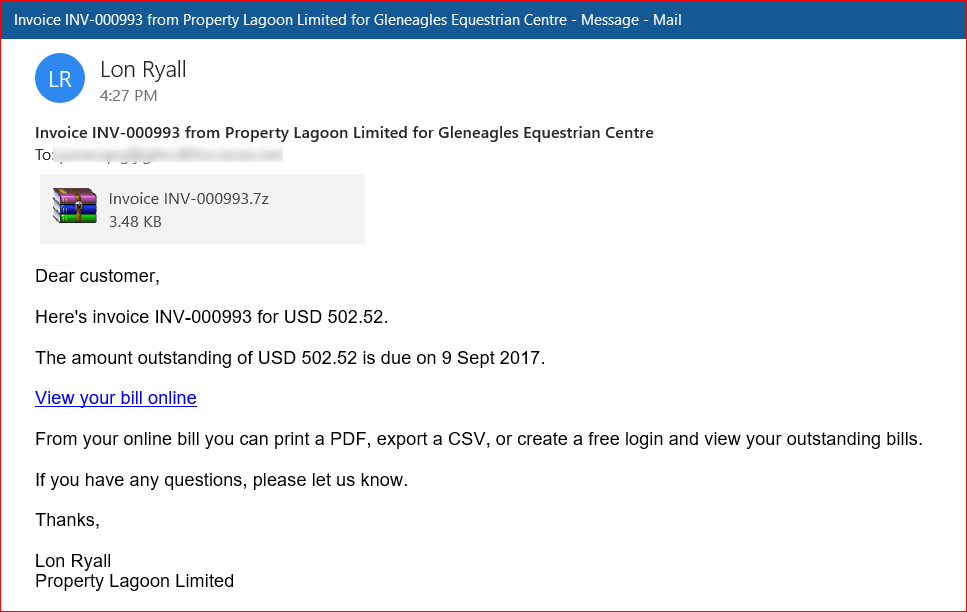
Though the use of email is generally regarded as safe, there eventually will come a time when a malicious email pops up in your inbox. Some disguise themselves as free cruise ship offers or strange App Store alerts but most of the time are easy to spot. However, those malicious emails which you may simply ignore or delete, others might fall for the bait and proceed to follow the instructions and download possible attachment in those emails. Such attachments would most certainly be malicious and ruin the day of the individual when moments after opening the attachment they are greeted with a red screen informing them of a bitcoin payment to get their data back. Unknowingly to them, they have fallen victim to a ransomware attack.

As unlikely as the above situation sounds, such situations are far from uncommon. In the two year span from 2017 to 2019, ransomware phishing emails grew 109% with a new victim every 14 seconds. Cybersecurity and IT experts such as Ron Bush warn that “we’re at war and don’t realize it,” with many Americans not realizing just how much data is being stolen. Even with the ever increasing awareness towards ransomware, many critical sectors like hospitals and police departments remain vulnerable. The frequency of these sectors falling victim to ransomware attacks is increasing with cases such as the November 2019 ransomware attacks that left dozens of hospitals non-operational. Perhaps more has to be done, even with existing solutions such as secure email servers capable of filtering out malicious emails from IT companies such as FireEye. While many security experts see software solutions as the answer to the problem, they are limited to individuals who are willing to pay for the prescription plans or sacrifice some efficiency and easy access that comes with using email.

With the abundance of advanced ransomware prevention solutions such as FireEye’s software available on the market, perhaps there are more intelligent solutions available. These solutions would instead combat ransomware attacks through education and awareness, instead of building a fort around the problem like the software solutions do. IT firms like Sophos follow such an approach and offer a product consisted of hyper realistic training for employees. This product allows for “automated attack simulations” which would allow employees to experience an attack, and thus making them more aware. In such cases, it isn’t necessary the sophisticated software that is needed to filter out possible attacks, but an experience that will put a straightforward message into the person on how to spot malicious emails. Infact, considering that filtering software would only cover the individual in their work environment, the individual could still fall victim when using their personal email accounts.

Considering the severity of ransomware, why haven’t more companies brought this topic up? A simple google search on emails safety reveals thousands of websites with tips on how to prevent yourself from falling victim. Additionally, institutions such as University of Rochester provide very simple and easy to read tips on email safety and detecting malicious emails which could easily reduce the number of incidents involving ransomware. These tips could easily be printed out and placed next to a screen in a hospital or police station which could help a user verify a suspicious email.

As to why ransomware keeps rising even with amount of solutions to prevent it, a lot of it has to do with not knowing the problem. Not many people know about ransomware until they have fallen victims themselves. Such a case is similar to when one falls ill with an infection. That individual would not know much about the effects of the infection beforehand until they have gotten it themselves. As to what could be done beforehand, the best solution solution would be to simulate an infection in order to grasp its effects. Similarly to Sophos solution but free, my solution would allow many people to experience the effects of ransomware. Through this experience, they would be more cautious in trying to prevent ransomware, similarly to trying to avoid a bad infection for the second time. It would be at this point when prevention tips from sites such as University of Rochester are introduced. Ultimately, many people would be able to become informed at the price of an experience instead of the cost of a bitcoin payment later on.

Perhaps, the easiest way to prevent ransomware is to use the same level of caution one uses in their everyday life and apply it to emails. If an offer presented in the email is too good to be true or one is asked to download some attachment for a support ticket that they never wrote, treat it as a threat and avoid it at all costs.

Design a site like this with WordPress.com
Get started